TECH
Troubled by Fake WhatsApp Calls? Turn On This Hidden Feature to Silence Unknown Numbers Instantly
Spam and scam calls on WhatsApp are becoming increasingly common, with cybercriminals using international and unknown numbers to target users across the world. Many scammers pretend to be bank officials, delivery executives, customer care representatives, or technical support agents in an attempt to steal sensitive information or trick people into financial fraud.
As fake WhatsApp calls continue to rise, many users are searching for a simple way to stop constant disturbances without blocking every suspicious number manually. Fortunately, WhatsApp already offers a built-in privacy feature that can automatically silence calls from unknown contacts while still keeping the call records visible.
The feature is called “Silence Unknown Callers,” and cybersecurity experts say it can significantly reduce unwanted interruptions and help users stay protected from suspicious calls.
What Is WhatsApp’s “Silence Unknown Callers” Feature?
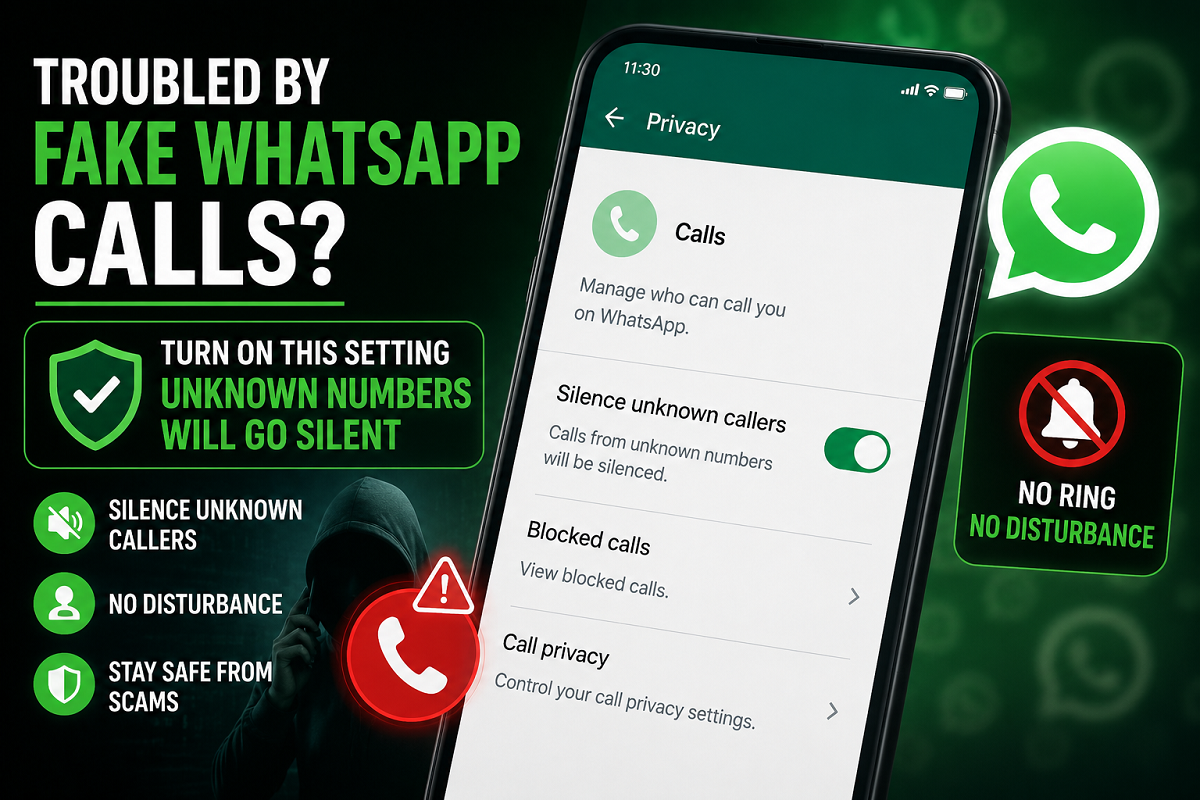
The “Silence Unknown Callers” setting is a privacy tool available within WhatsApp that automatically silences incoming voice and video calls from numbers that are not saved in your contacts or have never interacted with you before.
Once enabled, your phone will no longer ring for these unknown callers. However, the calls are not completely blocked.
Instead:
- The missed call will still appear in your WhatsApp call history.
- Notifications will remain visible.
- Users can decide later whether the call was important enough to return.
This gives users better control over spam without risking the loss of important communication.
Why Spam Calls on WhatsApp Are Increasing
Digital fraud has evolved rapidly over the past few years, and messaging platforms have become major targets for scammers. Fraudsters often use random international numbers or temporary accounts to contact victims.
In many cases, scammers:
- Pretend to represent banks or financial institutions
- Claim there is an issue with your account
- Offer fake job opportunities
- Pose as delivery agents
- Attempt phishing attacks through suspicious links
Experts warn that even answering unknown calls can sometimes expose users to social engineering tactics or fraud attempts.
Because of this growing threat, privacy features like “Silence Unknown Callers” are becoming increasingly important for smartphone users.
How to Turn On the Feature
Enabling the setting takes less than a minute and does not require any additional app installation.
Steps to Activate “Silence Unknown Callers”
- Open WhatsApp on your smartphone.
- Go to the Settings section.
- Tap on “Privacy.”
- Select the “Calls” option.
- Find “Silence Unknown Callers.”
- Turn the toggle ON.
Android vs iPhone Navigation
- On Android devices, the Settings menu usually appears under the three-dot menu in the top-right corner.
- On iPhones, the Settings tab is generally located at the bottom of the screen.
Once activated, WhatsApp will automatically mute calls from unknown numbers.
Biggest Advantage of This Feature
One of the most useful aspects of this privacy setting is that it does not fully block callers.
If an important person contacts you from a new number — such as a delivery partner, office representative, or emergency contact — you can still see the missed call notification later and decide whether to respond.
This balance between privacy and accessibility makes the feature especially useful for professionals, business users, and people frequently disturbed by spam calls.
A Small Limitation Users Should Know About
While the feature is effective, there is one important limitation.
If you have previously messaged or interacted with an unsaved number on WhatsApp, the platform may no longer treat that number as “unknown.” In such cases, future calls from that contact could still ring normally even if the number is not saved in your phonebook.
This issue is commonly noticed with:
- Delivery agents
- Temporary office numbers
- One-time service contacts
- Cab drivers or local vendors
Even so, experts say the feature still provides strong protection against most spam and scam calls.
Why This Privacy Setting Matters Today
As online fraud and digital harassment continue to grow, managing communication privacy has become more important than ever. Constant spam calls during meetings, office hours, or late at night can become frustrating and disruptive.
Although the “Silence Unknown Callers” feature may not eliminate spam entirely, it gives users greater control over who can disturb them and when.
Cybersecurity specialists recommend enabling the setting immediately, especially for users who receive frequent international or suspicious WhatsApp calls. A simple privacy adjustment today could help prevent major scams and unnecessary disturbances in the future.