BUSINESS
DigiLocker Tips: Keep Your Driving Licence, RC and Important Documents Safe on Your Smartphone
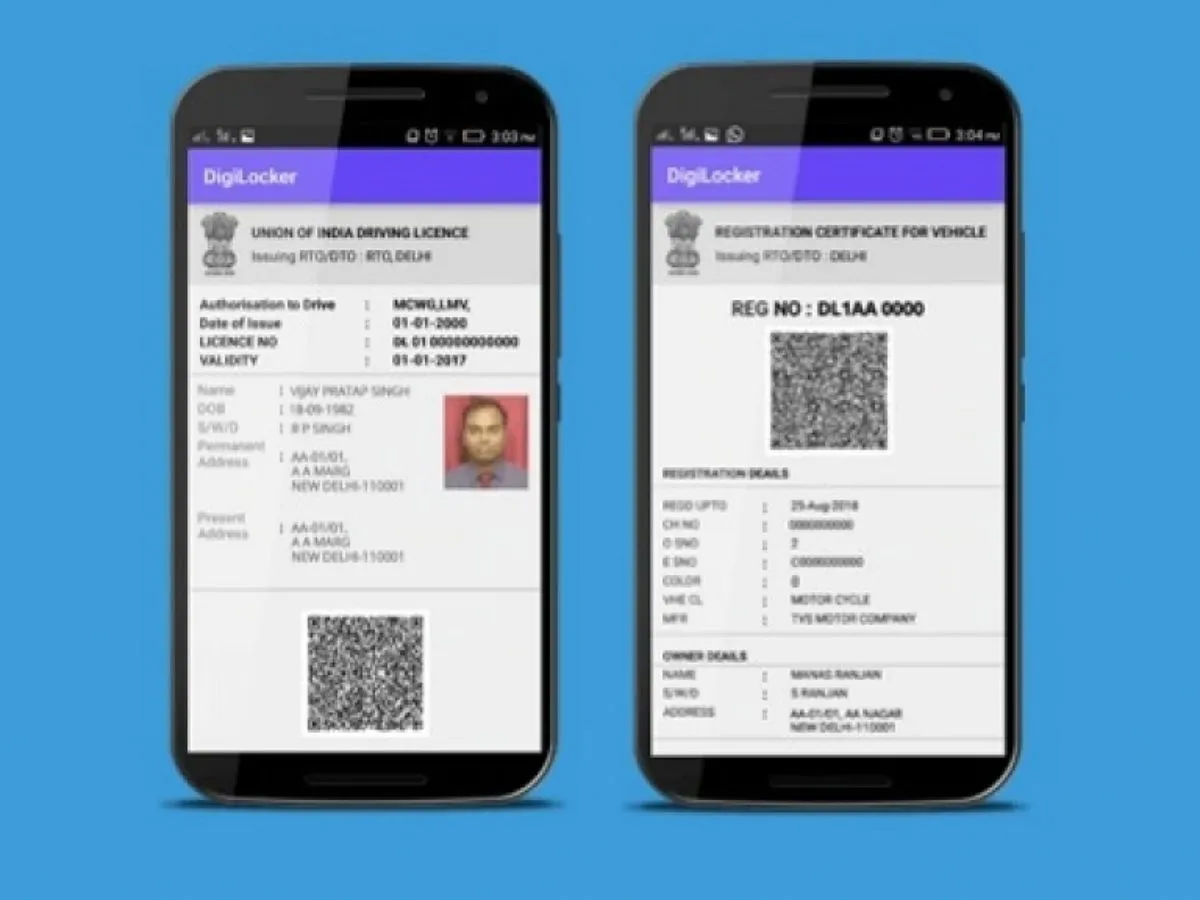
Carrying physical documents everywhere can be inconvenient, especially when you need your driving licence, vehicle registration certificate or educational certificates urgently. To make document management easier, the Indian government introduced DigiLocker, a digital platform that allows citizens to access and store important documents electronically.
Many people use DigiLocker only to download their Aadhaar or driving licence, but the platform offers several other useful facilities. Here is how you can make better use of it.
1. Store Your Driving Licence Digitally
You can access your driving licence through DigiLocker without carrying the physical card everywhere. Documents issued or fetched from authorised government departments are digitally verifiable.
Digital driving licences and vehicle registration certificates available through DigiLocker are recognised under applicable government rules.
2. Keep Your Vehicle RC Available
If you own a car or motorcycle, you can fetch your Registration Certificate (RC) through DigiLocker, where the relevant issuing authority supports the service.
This can be useful when you need to show your vehicle documents during a traffic check or other verification.
3. Download Your Educational Certificates
Students and working professionals can use DigiLocker to access academic documents issued by participating educational boards, universities and institutions.
Depending on availability, you may find:
-
Class 10 and Class 12 marksheets
-
University degree certificates
-
Diploma certificates
-
Migration certificates
-
Other academic records
These digitally issued documents can be useful during job applications, admissions and document verification.
4. Access Your Documents Without Carrying Files
One of DigiLocker's biggest advantages is that you can access important documents through your smartphone. This reduces the need to carry multiple photocopies or physical documents.
However, you should ensure that you have access to your registered mobile number and internet connection whenever you need to log in.
5. Understand the Difference Between Uploaded and Issued Documents
DigiLocker provides two types of document storage options.
Issued documents are fetched directly from registered government departments or authorised institutions. Uploaded documents are files that you personally add to your DigiLocker account.
This distinction is important because an issued document can be digitally verified through its issuing authority, while an uploaded file may simply be a stored copy.
6. Keep Your DigiLocker Account Secure
Since DigiLocker can contain sensitive personal and financial documents, account security is extremely important.
Follow these precautions:
-
Never share your OTP or login credentials.
-
Avoid accessing your account through suspicious links.
-
Use a secure screen lock on your smartphone.
-
Do not download documents on untrusted public devices.
-
Log out after accessing your account on another device.
How to Start Using DigiLocker
Visit the official website, digilocker.gov.in, or download the DigiLocker application from your smartphone's official app store.
Register using the required details and complete the verification process. You can then search for participating issuers and fetch available documents into your account.
DigiLocker can make everyday document management considerably easier. Whether you are travelling, applying for a job or dealing with vehicle-related verification, having your important documents accessible digitally can save time and reduce paperwork.
uments Safe on Your Smartphone
Carrying physical documents everywhere can be inconvenient, especially when you need your driving licence, vehicle registration certificate or educational certificates urgently. To make document management easier, the Indian government introduced DigiLocker, a digital platform that allows citizens to access and store important documents electronically.
Many people use DigiLocker only to download their Aadhaar or driving licence, but the platform offers several other useful facilities. Here is how you can make better use of it.
1. Store Your Driving Licence Digitally
You can access your driving licence through DigiLocker without carrying the physical card everywhere. Documents issued or fetched from authorised government departments are digitally verifiable.
Digital driving licences and vehicle registration certificates available through DigiLocker are recognised under applicable government rules.
2. Keep Your Vehicle RC Available
If you own a car or motorcycle, you can fetch your Registration Certificate (RC) through DigiLocker, where the relevant issuing authority supports the service.
This can be useful when you need to show your vehicle documents during a traffic check or other verification.
3. Download Your Educational Certificates
Students and working professionals can use DigiLocker to access academic documents issued by participating educational boards, universities and institutions.
Depending on availability, you may find:
-
Class 10 and Class 12 marksheets
-
University degree certificates
-
Diploma certificates
-
Migration certificates
-
Other academic records
These digitally issued documents can be useful during job applications, admissions and document verification.
4. Access Your Documents Without Carrying Files
One of DigiLocker's biggest advantages is that you can access important documents through your smartphone. This reduces the need to carry multiple photocopies or physical documents.
However, you should ensure that you have access to your registered mobile number and internet connection whenever you need to log in.
5. Understand the Difference Between Uploaded and Issued Documents
DigiLocker provides two types of document storage options.
Issued documents are fetched directly from registered government departments or authorised institutions. Uploaded documents are files that you personally add to your DigiLocker account.
This distinction is important because an issued document can be digitally verified through its issuing authority, while an uploaded file may simply be a stored copy.
6. Keep Your DigiLocker Account Secure
Since DigiLocker can contain sensitive personal and financial documents, account security is extremely important.
Follow these precautions:
-
Never share your OTP or login credentials.
-
Avoid accessing your account through suspicious links.
-
Use a secure screen lock on your smartphone.
-
Do not download documents on untrusted public devices.
-
Log out after accessing your account on another device.
How to Start Using DigiLocker
Visit the official website, digilocker.gov.in, or download the DigiLocker application from your smartphone's official app store.
Register using the required details and complete the verification process. You can then search for participating issuers and fetch available documents into your account.
DigiLocker can make everyday document management considerably easier. Whether you are travelling, applying for a job or dealing with vehicle-related verification, having your important documents accessible digitally can save time and reduce paperwork.