TECH
WhatsApp users can now schedule messages! No more forgetting birthdays or important reminders, here's how the new feature works
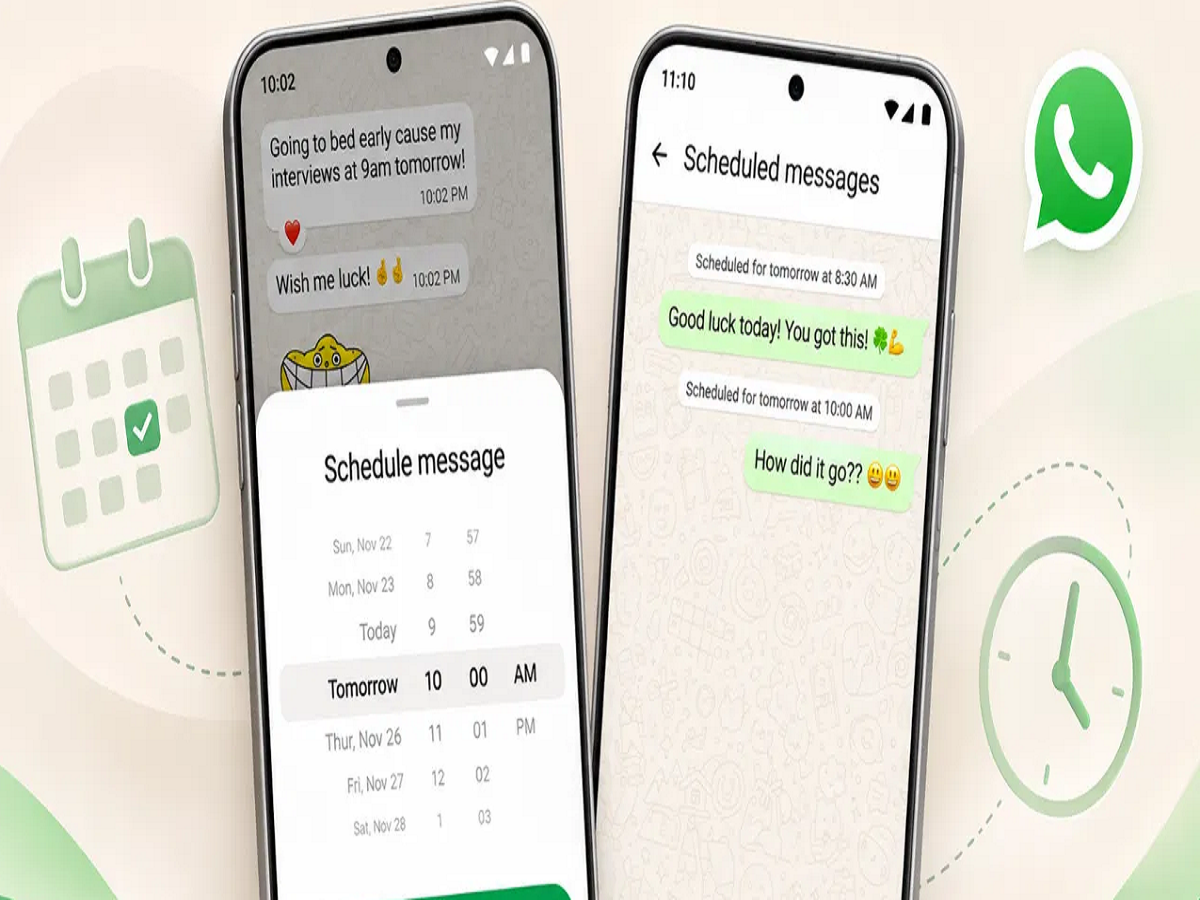
WhatsApp is constantly introducing new features to make communication easier for its billions of users. Now, the popular messaging platform is reportedly rolling out one of the most awaited features: scheduled messages. With this facility, users will be able to write a message in advance and decide when it should be delivered. This means you will no longer have to remember to send birthday wishes at midnight, follow-up messages during working hours or important reminders at a particular time.
What is the new scheduled message feature?
Until now, WhatsApp users had to send messages manually or depend on third-party applications and complicated workarounds to automate their messages. However, the new feature is designed to make this process much simpler.
With scheduled messages, users can prepare a text message, photograph or video and select a future date and time for delivery. WhatsApp will then automatically send the message at the selected time.
The feature is particularly useful for people who manage multiple conversations throughout the day. For example, if you remember an important task late at night but do not want to disturb someone, you can schedule the message for the following morning.
Similarly, users can prepare birthday wishes, anniversary greetings, meeting reminders and work-related updates beforehand.
How will users schedule messages on WhatsApp?
The feature is designed to work within the existing WhatsApp messaging interface, so users will not need to install a separate application to use it.
Once the feature becomes available on their account, users will be able to compose a message, choose the scheduling option and select the preferred delivery time. The scheduled message will remain available for review until its delivery.
Users will also be able to manage scheduled messages, allowing them to make changes or delete a message before it is sent. This can be particularly helpful if plans change or the information in a message becomes outdated.
Scheduled messages could be useful for businesses too
The feature is not limited to personal conversations. Small business owners, online sellers and professionals may also find it useful.
For instance, a shop owner can prepare customer updates in advance, while freelancers can schedule reminders about pending payments or project deadlines. People managing multiple work-related conversations can also avoid repeatedly checking their phones to send messages at specific times.
However, users should remember that scheduled messages are not a replacement for professional bulk-messaging tools. Businesses handling large customer databases will still need dedicated communication solutions.
Will the feature work when the phone is switched off?
One of the most interesting aspects of the reported rollout is that scheduled messages are designed to work even when the sender's phone is switched off. This would make the feature more convenient than traditional automation methods that depend on a device being active at the scheduled time.
However, availability and exact functionality may depend on the version of WhatsApp and the platform being used.
What should users do to get the feature?
Users should keep their WhatsApp application updated through the Google Play Store or Apple App Store. The feature is being rolled out gradually, so it may not appear on every account immediately.
If the scheduling option is not visible, users may have to wait for the update to reach their device. Installing unknown third-party applications or modified versions of WhatsApp to access such functionality is not recommended because they can create privacy and security risks.
Overall, scheduled messages could become one of WhatsApp's most practical additions. While features such as voice messages, disappearing chats and video calls have already changed how people communicate, automatic message scheduling addresses a much simpler everyday problem: remembering to send the right message at the right time.