TECH
Your Phone May Be Listening to You — Or Is It? 7 Privacy Settings You Should Change Today to Protect Your Personal Data
Have you ever discussed buying a pair of shoes with a friend and then noticed advertisements for shoes appearing on your social media feed? Many smartphone users have experienced something similar and wondered whether their phones are secretly listening to their conversations.
The reality is more complicated. Advertising platforms can use browsing activity, app interactions, location information, searches and other signals to predict what you might want to buy. While microphone access can create genuine privacy risks when misused, seeing a relevant advertisement does not, by itself, prove that your phone is secretly recording you.
The good news is that you can take practical steps to limit how much personal information your smartphone shares with apps and advertising platforms.
1. Check Which Apps Have Access to Your Microphone
Many applications request microphone access for legitimate features such as voice calls, video recording and voice messages. However, some apps may not need this permission for their core functions.
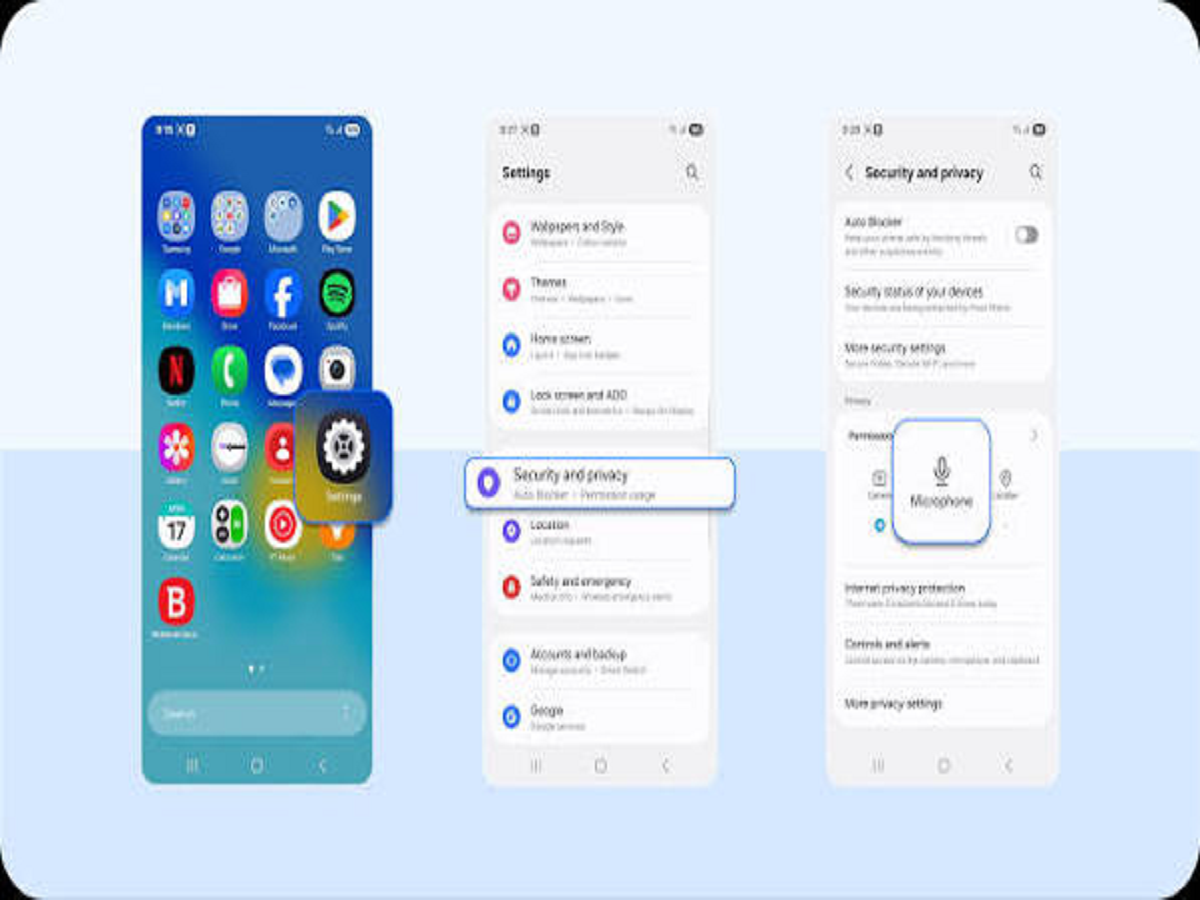
On Android, open Settings, go to Privacy or Permission Manager, and select Microphone. Review which apps have access and remove permission from applications that do not need it.
On an iPhone, open Settings, select Privacy & Security, and tap Microphone.
Remember that restricting microphone access can affect voice-related features. You can grant permission again when you genuinely need it.
2. Stop Apps From Tracking Your Location Unnecessarily
Location data can reveal where you live, work, travel and spend your time. Some applications need this information to function properly, but others may request more access than necessary.
Check your location permissions and choose the most restrictive setting that still allows the app to work.
For example, a navigation app may need location access while you are travelling, whereas a simple calculator generally does not.
On Android, look under Settings and Location or Permission Manager. On an iPhone, open Settings, then Privacy & Security, followed by Location Services.
Where available, use options such as “While Using the App” rather than allowing continuous background access.
3. Limit Advertising Tracking on Your Phone
Advertising systems can use activity across apps and websites to build profiles of users' interests.
You can reduce some forms of tracking through your phone's privacy settings.
On an iPhone, open Settings, select Privacy & Security, and choose Tracking. You can disable permission for apps to request tracking.
On Android, advertising privacy controls vary by device and software version. Search Settings for “Ads” or “Advertising privacy” to review available controls.
These settings can limit certain tracking practices, but they do not eliminate all personalised advertising. Services may still use information collected within their own apps or other permitted signals.
4. Review Apps That Can Access Your Photos and Files
A photo-editing app may need access to selected pictures, but it may not need access to your entire photo library.
Whenever possible, grant access only to the files an application requires.
On iPhone, review photo permissions under Settings and Privacy & Security. On Android, check Photos and Videos, Files or the relevant permissions section.
Be particularly careful with unfamiliar applications that request access to photos, contacts, SMS messages or files without a clear reason.
If an app does not work without unnecessary access, consider whether you really need to use it.
5. Turn Off Unnecessary 's name and recent reviews before installing an unfamiliar app.
Avoid installing APK files received through random messages or websites.Keep your operating system and applications updated.Remove apps you no longer use.On Android, keep Google Play Protect enabled and review its security warnings.
Be cautious of applications promising free premium subscriptions, instant loans, unusually high returns or access to exclusive content in exchange for extensive permissions.
7. Check Which Devices Are Connected to Your Accounts
Your privacy risks may extend beyond your phone. An old laptop, shared tablet or unfamiliar device could still have access to your email, photos or social media accounts.
Review the signed-in devices and active sessions for your Google, Apple and social media accounts.
Sign out of devices you no longer recognise or use. If you suspect someone has accessed your account without permission, change the password from a trusted device and enable two-factor authentication.
Use a unique password for each important account. A password manager can help you generate and securely store different passwords without having to memorise them all.
Does Your Phone Really Listen to Every Conversation?
There is no reliable basis for assuming that every relevant advertisement is caused by your phone secretly recording conversations.
Several other mechanisms can explain why an advertisement appears shortly after you discuss a product. You may have searched for a related item earlier, visited a relevant website, interacted with similar content or been included in an advertising audience based on permitted data signals.
Advertisers can also make surprisingly accurate predictions from patterns in browsing behaviour, purchases and other activity.
Nevertheless, microphone permissions and app privacy deserve attention. An app with microphone access may be able to use it for its stated functions, and malicious or abusive software can create genuine risks.
The practical solution is to review permissions, keep software updated and understand what information you share with digital services.
Final Takeaway
Your smartphone can reveal a great deal about your habits, interests and daily routine, even without continuously recording your conversations. App permissions, location history, advertising identifiers and account activity can all contribute to the information digital services collect.
By reviewing your privacy settings regularly, limiting unnecessary permissions and installing apps carefully, you can reduce your exposure to unwanted tracking and misuse of personal data.
The most effective privacy habit is simple: do not automatically approve every permission request. Check what an app needs, understand why it needs it, and share only what is necessary.